Source code in Pascal
Delphi & Pascal (česká wiki)
Pages: [actual] [11-20] [21-30] [31-40] [41-50] [51-69]
Order:1
 Program: 1inca.pas, Bignum.pas, Math.pas, Use_bn.pas
File exe: 1inca.exe
Order:2
 Program: 8smer.pas
File exe: 8smer.exe
need: Rutiny.pas, Trsek.pas, Tajnicka.dat
Order:3
Program: Aritmet.pas
File exe: Aritmet.tpu
Order:4
Program: Aritmeticky_vyraz.pas
File exe: Aritmeticky_vyraz.exe
Order:5
 Program: Ascii.pas
File exe: Ascii.exe
File ubuntu: Ascii
Order:6
 Program: Auto.pas
File exe: Auto.exe
need: Cisel.pas, Auta.dat, Spz.cis
Order:7
Program: Banka.pas
File exe: Banka.exe
need: Bank.in
Order:8
Program: Bar_graph.pas
File exe: Bar_graph.exe
Order:9
Program: Cedecko.pas
File exe: Cedecko.exe
Order:10
Program: Chess_queen.pas
File exe: Chess_queen.exe
Pages: [actual] [11-20] [21-30] [31-40] [41-50] [51-69]
Order:1
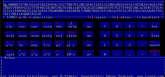
Program: 1inca.pas, Bignum.pas, Math.pas, Use_bn.pasFile exe: 1inca.exe
Program compute basic mathematics operation for infinity decimal places. Other mathematical operation (sin, cos, ..) make with Taylor series.
Description:
Description:
- For easy use look for use_bn.pas
- Program has maximal 250 decimal places. More decimal you set before compilation program
- Long time computing seeing convergetion of Taylor series
Order:2
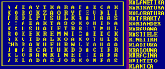
Program: 8smer.pasFile exe: 8smer.exe
need: Rutiny.pas, Trsek.pas, Tajnicka.dat
The program fills out grid of a crossword. The file tajnicka.dat works as an entry. It gives the description of the crossword's format, the number of letters for its successful ability to solve and, of course, the words which are supposed to be found. The editor of the crossword is not included.
Order:3
Program: Aritmet.pas
File exe: Aritmet.tpu
Unit for calculate some arithmetic expression with recursion expression. Beyond arithmetic expressions know sin(), cos(), int(), abs() and sqrt().
Order:4
Program: Aritmeticky_vyraz.pas
File exe: Aritmeticky_vyraz.exe
Vyhodnocení aritmetického výrazu soustavou procedur ve vztahu nepřímé rekurze podle formální gramatiky stavby výrazu.
Order:5
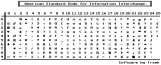
Program: Ascii.pasFile exe: Ascii.exe
File ubuntu: Ascii
It displays 0-255 ASCII table. In the times of DOS programming it was unquestionably a very much used program.
Program store text background and after close program, restore it.
Program store text background and after close program, restore it.
Order:6
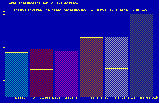
Program: Auto.pasFile exe: Auto.exe
need: Cisel.pas, Auta.dat, Spz.cis
It is one of the assignments I made for my friend, but because it is so complicated I resolved to include it in here. By the way, assignments are to be found here.
Order:7
Program: Banka.pas
File exe: Banka.exe
need: Bank.in
Klienti si v bance BVS zakládají účty, ukládají na ně peníze a provádějí výběry. Když nejsou spokojeni, tak si účet zruší. Co banka potřebuje?
Klienti jsou identifikováni pomocí unikátních šesticiferných čísel, která nezačínají 0.
V souboru bank.in jsou na každém řádku transakce z jednoho dne provozu banky oddělené znakem středník (za poslední operací na řádku je taky). Kódování jedné transakce je následující:
CISLO_UCTU:KOD:CASTKA;
kde:
CISLO_UCTU je šestimístné číslo, které jednoznačně identifikuje klienta.
nbsp;nbsp; KOD je velké písmeno, které určuje typ transakce. Možnosti jsou:
nbsp;nbsp; N .... založit nový účet (New)
nbsp;nbsp; Q....zrušit existující účet (Quit)
nbsp;nbsp; I .... zvýšit uloženou částku na daném účtu (Increase)
nbsp;nbsp; D....snížit uloženou částku na daném účtu (Decrease)
Program má za úkol provést zadané transakce pro všechny dny (řádky souboru bank.in). Do souboru bank.out má potom vypsat pro každý den hlášení o průběhu transakcí a výpis aktuálního stavu všech účtů. Výpis každého dne začíná řádkem:
Klienti jsou identifikováni pomocí unikátních šesticiferných čísel, která nezačínají 0.
V souboru bank.in jsou na každém řádku transakce z jednoho dne provozu banky oddělené znakem středník (za poslední operací na řádku je taky). Kódování jedné transakce je následující:
CISLO_UCTU:KOD:CASTKA;
kde:
CISLO_UCTU je šestimístné číslo, které jednoznačně identifikuje klienta.
nbsp;nbsp; KOD je velké písmeno, které určuje typ transakce. Možnosti jsou:
nbsp;nbsp; N .... založit nový účet (New)
nbsp;nbsp; Q....zrušit existující účet (Quit)
nbsp;nbsp; I .... zvýšit uloženou částku na daném účtu (Increase)
nbsp;nbsp; D....snížit uloženou částku na daném účtu (Decrease)
Program má za úkol provést zadané transakce pro všechny dny (řádky souboru bank.in). Do souboru bank.out má potom vypsat pro každý den hlášení o průběhu transakcí a výpis aktuálního stavu všech účtů. Výpis každého dne začíná řádkem:
Order:8
Program: Bar_graph.pas
File exe: Bar_graph.exe
Randomize generated bargraf for pascal use. In variable count is count and in array value are bar graph values.
Order:9
Program: Cedecko.pas
File exe: Cedecko.exe
Program for manipulate with CD-ROM. Get how much CD-ROM you have, letter of CD-ROM, run/stop audio playing.
Order:10
Program: Chess_queen.pas
File exe: Chess_queen.exe
Program rieši problém umiestnenia 8 dám na šachovnicu tak, aby sa vzájomne neohrozovali.
Pages: [actual] [11-20] [21-30] [31-40] [41-50] [51-69]